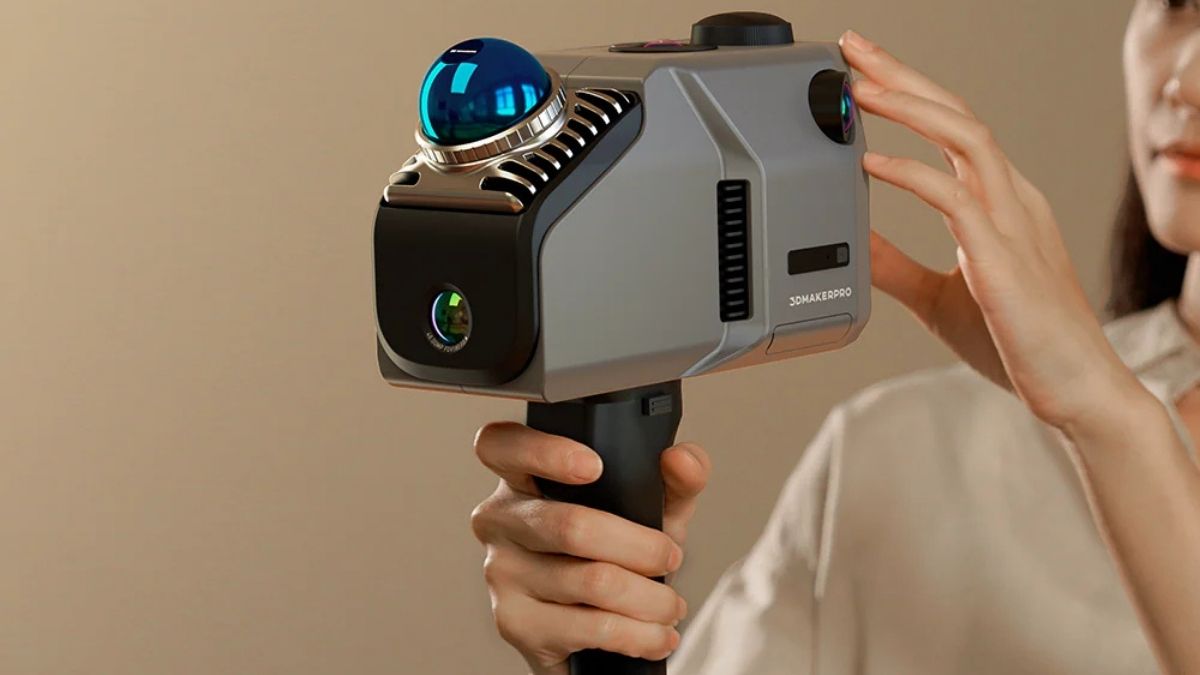
The 3DMakerpro Eagle is built for scene-scale scanning rather than small object digitizing.
It is designed to capture buildings, interiors, outdoor sites, and production environments as colored point clouds and 3D models. That makes it a better fit for professionals who need speed, range, and usable visual context in one device.
Its audience is broad but clearly professional. Architects, surveyors, engineers, construction teams, real estate documentarians, heritage specialists, and virtual production crews are the most obvious users.
For these workflows, the Eagle focuses on practical mobility and a smoother path from capture to software output.
LiDAR Performance Is the Main Selling Point
The Eagle’s biggest strength is range. It can scan up to 140 meters, with real-world operating distance depending on surface reflectivity and conditions. It also keeps respectable accuracy across useful distances:
- 2 cm at 10 m
- 3 cm at 20 m
- 5 cm at 40 m
The scanner uses a 905 nm Class 1 laser and captures up to 200,000 points per second. Combined with a 360-degree horizontal field of view and 59-degree vertical field of view, that gives it the coverage needed for large environments.
This is where the Eagle separates itself from close-range handheld scanners. It is not mainly for small, detailed tabletop assets. It is built for rooms, facades, sets, and mapped environments.
Imaging Adds More Than Raw LiDAR Data
The Eagle is not just a point-cloud tool. It also includes panoramic imaging for textured output and better visual documentation.
The Standard Edition comes with one 48 MP fisheye camera. The Max Edition uses four 48 MP fisheye cameras for broader coverage. Both versions support 8K panoramic color with HDR across multiple exposure levels.
That matters for teams working in design, visualization, digital twins, and virtual production. Clean geometry is important, but visual context often decides whether a scan is useful beyond measurement.
The Hardware Supports Fast Field Use
A built-in 3.5-inch display gives live preview during scanning. That helps operators check framing and coverage without relying fully on an external device.
Inside, the scanner includes:
- 8-core processor at 2.4 GHz
- 32 GB memory
- TF card expansion
- Dual USB-C ports
- Wi-Fi 5 connectivity
At 115 × 181 × 106 mm and 1.5 kg, it is portable enough for handheld work. Still, it is not light. For short sessions that may not matter, but long capture days will likely call for a tripod, mount, or support rig.
Software Compatibility Helps It Fit Pro Pipelines
The Eagle’s companion software handles editing, AI denoising, 3D modeling, measurements, surveying tools, and panoramic tour creation. Export support includes PLY, OBJ, and Gaussian splatting outputs.
It also works with platforms like Revit, Unreal Engine, and Blender. That gives it more value for users who need scans to move into design, documentation, or visualization workflows instead of staying trapped in proprietary software.
One limitation is clear: support is currently Windows 11 only. That makes the scanner less flexible for teams centered on macOS or mixed-platform environments.
Mobile Capture and RTK Expand Its Use
The Eagle is not limited to handheld indoor work. It can also be mounted on vehicles, tripods, and drones. It supports motion capture up to 20 km/h, which opens the door for infrastructure surveys and faster area documentation.
There is also an optional RTK module. When paired with a base station and differential correction, it can improve absolute point-cloud accuracy to around 1–3 cm. For surveying and construction use, that upgrade could be a major factor.
What Buyers Should Weigh Before Choosing It
The Eagle is strong in range, workflow flexibility, and textured output. But it does come with trade-offs.
- Battery life is about 1 hour
- Weight can become tiring in long handheld sessions
- Advanced processing needs a capable Windows PC
- Gaussian splatting requires an NVIDIA GPU
In simple terms, the scanner may be competitively priced for its class, but the full working setup can cost more once computing needs are included.
The 3DMakerpro Eagle makes the most sense for users who scan large spaces often and need a practical bridge between field capture and production-ready 3D data.
Leave a Reply